User Information:
When you joined BudgetHostingWeb, you instantly became a part of our network and community.
Your information shown to this community is fully customizable by you along with several other fields that effect your overall
site functionality.
Return to the main
index
Changing your user information
One of the features of BudgetHostingWeb Sites enables you to change your password,
name, email address and site name/description at any time. To change any user information, login to
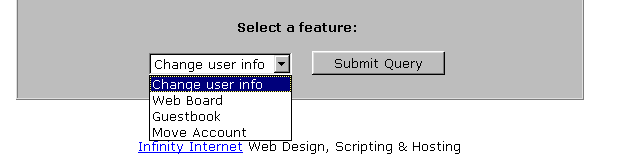
your File Manager and go to the bottom of the page where you will see a
drop down list. Select "Change user info" from this list and click the "Submit Query" button.
Return to the main
index
Changing your password
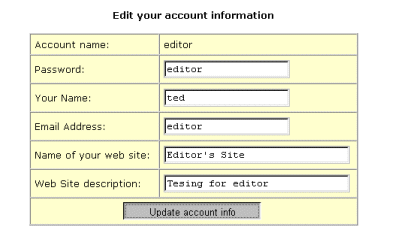
Once you are on the change user information page, you have the ability to change your password by simply typing the new
password into the password field and clicking the "Update Account Info" button. This will change your password
for the File Manager, so write it down because our administrators may not be able to
retrieve it for you if you lose it!
Return to the main
index
Changing your Site Name/Description
Every site created at BudgetHostingWeb can be viewed in our community
search engine. If you want to change your listing information, you can do so under the user information page.
To change your site information, simply fill in the Site Name and Site Description field
and click the "Submit Query" button and the information will instantly be updated
Return to the main
index
Free Space
To check how much web space you have left on your account, login to the File
Manager and scroll down to the bottom of the page.
There should be a line telling you that #### used, ##### free space is left. This tells you just how much space your site and
web board
is taking up now and how much space is left on your account for you to use. To get more space, delete files or add more disk
space here.
Set Up Your Own Customized "404:File Not Found" Page
If you are hosting your own domain, you can
set up your own 404:File Not Found error page. To do this, create a file
called missing.html in the root directory of your site. As long as it's
called missing.html and it's in your root www directory, the server will
display it whenever someone tries to access a page on your domain that
does not exist. Return to the main
index
Unzip Files In Your Site
Most of our Members unzip files on their local computers before uploading. However it is possible to unzip files in your
site using PHP. Here are the instructions:
Upload your new zip together with bhwunzip.php to your server.
Make sure the zip file is in the correct directory on your server where you would like it to be extracted.
Open the file bhwunzip.php in your browser. For example, if you upload it to your base directory, open the following
with your browser:
https://www.yourdomain.com/bhwunzip.php
Browse your server's directories and click the zip file to unzip it.
When you're finished you can delete both the zip file and bhwunzip.php to save space.